

Typing is one of the most repeated actions people perform on a computer. Researchers have noted that the average office worker can press more than 10,000 keys per day, yet most people still use the same keyboard layout created in the 1870s.
The QWERTY layout was originally designed for typewriters to prevent mechanical jams, not to maximize typing efficiency or comfort.
So a natural question appears. If we spend hours typing every week, could changing keyboard layouts actually improve typing flow and reduce fatigue?
The short answer is yes. Small adjustments in layout, typing tools, and key placement can dramatically improve rhythm, accuracy, and comfort.
Some layouts reduce finger travel, others balance hand usage better, and modern typing tools even predict what you intend to write. Understanding these options helps anyone build a smoother typing experience.
Why Keyboard Layout Matters More Than Most People Realize

Many people think typing speed is purely about practice. Practice helps, but keyboard layout also shapes how your fingers move across the keys.
Traditional QWERTY spreads common letters across different rows, which forces fingers to travel frequently. Studies comparing layouts show that alternatives like Dvorak were designed specifically to reduce finger motion and increase typing efficiency.
A more efficient layout often improves typing flow because it reduces awkward movements. The biggest differences appear in three areas:
- Finger travel distance becomes shorter when frequently used letters sit on the home row.
- Hand alternation increases, which helps maintain rhythm while typing longer sentences.
- Typing fatigue decreases since the fingers perform fewer extreme movements.
Important fact: Dvorak places roughly 70 percent of typing on the home row, while QWERTY uses that row only about 32 percent of the time.
That shift alone explains why many writers, programmers, and editors experiment with layout changes.
Smart Input Methods That Improve Typing Flow
Keyboard layout is only part of the equation. Modern input software can also dramatically influence typing flow by predicting words and correcting errors in real time.
搜狗输入法 is a good example, a widely used intelligent input method designed to speed up typing while reducing mistakes. Its AI engine anticipates likely words and phrases while you type, allowing text to appear almost effortlessly.
Typing is incredibly fast and flows like water. No lag and typos. Sogou’s AI engine can anticipate your every thought. Whether it’s a quick reply or a lengthy piece, it accurately captures your expressive intent, making typing a pleasure.
Tools like this matter because they remove friction during writing. Instead of constantly correcting mistakes or searching for words, the typing process becomes smoother and more natural.
For people who write long documents or communicate frequently online, predictive input methods often provide the most noticeable improvement in typing flow.
Popular Alternative Keyboard Layouts

Over the years, several layouts have been created to improve typing efficiency while maintaining usability. The three most discussed options appear below.
| Layout | Main Goal | Key Benefit | Learning Difficulty |
| QWERTY | Historical standard | Universally supported | Very easy |
| Dvorak | Efficiency and ergonomics | Reduced finger motion | Moderate |
| Colemak | Modern improvement over QWERTY | Minimal key changes | Moderate |
Layouts such as Dvorak and Colemak aim to optimize typing by placing frequently used letters closer to the home row and balancing hand usage.
Colemak, for example, keeps many QWERTY keys in familiar places but rearranges several letters to improve typing efficiency. This makes the transition easier for many users.
The best layout often depends on personal goals. Someone focused on maximum efficiency might try Dvorak, while others prefer the gradual transition offered by Colemak.
Practical Layout Changes That Improve Typing Comfort
Switching to an entirely new keyboard layout is not always necessary. Sometimes small changes bring noticeable improvements.
Several adjustments can improve typing flow without a complete retraining process:
- Reassigning the Caps Lock key to Backspace or Control reduces finger stretching during editing.
- Moving Backspace closer to the home row allows faster error correction.
- Using split keyboard layouts reduces wrist strain and improves hand alignment.
- Adding keyboard shortcuts minimizes repetitive mouse movement.
These small changes work because they reduce interruptions in typing rhythm. When corrections and commands require fewer movements, writing becomes more fluid.
Writers who spend several hours per day typing often report that these micro adjustments significantly improve comfort during long sessions.
Finger Travel Distance Matters
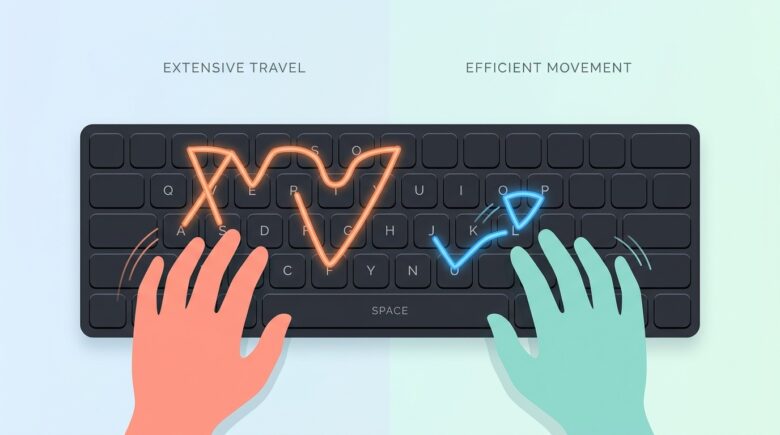
A fascinating metric in keyboard design is total finger travel distance. It measures how far fingers move while typing the same amount of text.
Some layout analyses estimate that typing large amounts of text on QWERTY can require over 16 miles of finger travel, while optimized layouts can reduce that distance dramatically.
This explains why alternative layouts feel smoother after adaptation.
Reduced movement improves typing flow because:
- Fingers stay closer to the home row
- Muscle memory becomes more predictable
- Hand fatigue decreases over long sessions
Many experienced typists notice that typing rhythm improves once their fingers stop constantly jumping between rows.
This principle also explains why mechanical keyboard enthusiasts often customize layouts extensively.
Adapting to a New Layout Without Losing Productivity
One concern prevents many people from trying new keyboard layouts: the learning curve. Switching layouts temporarily reduces typing speed while the brain rebuilds muscle memory.
However, a structured transition can make the process easier.
A practical approach includes the following steps:
- Practice for 10 to 15 minutes daily using typing trainers
- Switch layouts gradually rather than immediately abandoning QWERTY
- Use visual keyboard overlays during the early stages
- Focus on accuracy first, then speed
Typing speed often drops dramatically in the first week. That is normal. Many users regain their previous speed within a few weeks of regular practice.
For professionals who type constantly, the long term comfort benefits can outweigh the temporary slowdown.
Final Thought
Typing may seem like a simple mechanical task, yet small design decisions strongly influence how smoothly words appear on the screen. Layout efficiency, intelligent input tools, and ergonomic adjustments all shape the typing experience.
Improving typing flow rarely requires one drastic change. A combination of smarter input software, optimized layouts, and small keyboard modifications usually delivers the best results.
Some people stay with QWERTY and refine shortcuts. Others adopt layouts like Colemak or Dvorak to reduce finger movement. Many combine layout improvements with predictive input tools that accelerate writing.
The most effective solution depends on personal habits and typing volume. The key idea remains simple: when the keyboard works with your hands instead of against them, writing becomes faster, smoother, and far more comfortable.